
Contextium


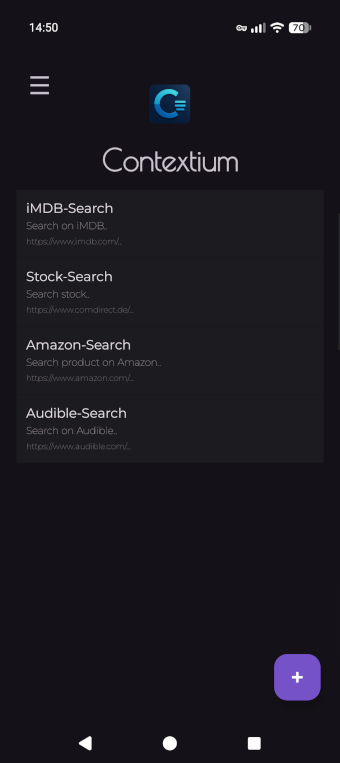
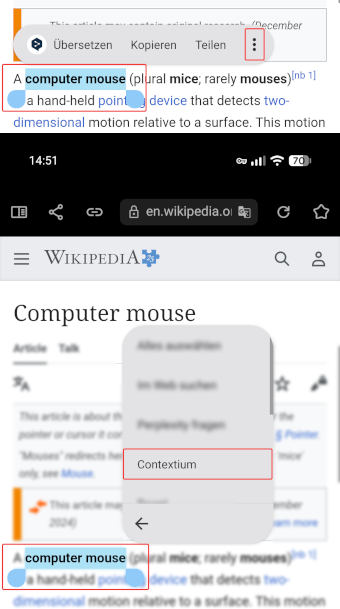
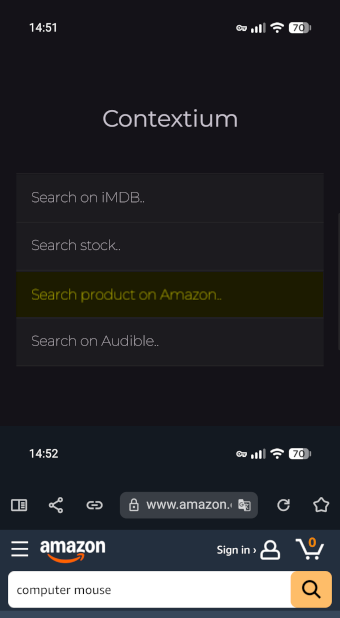
Contextium extends Android's native text-selection menu with configurable actions for web searches. It provides a separate, fully customizable context menu. Select text, choose Contextium from the context menu and pick one of your configured menu entries to pass the selected text to any website.
Since I search for audiobooks daily across various websites, I realized these repeated search steps of copy & paste could be streamlined. Contextium was built to simplify these repetitive workflows by turning them into one-tap actions directly from Android’s text‑selection menu.


Features
- Create unlimited context‑menu actions
- Configure individual search URLs
- Access all actions from Android’s native text‑selection menu
- Export and import your configuration for backup
- Reorder actions via drag-and-drop
- Enable or disable actions individually
Installation
F-Droid (recommended)
- Open F-Droid App and search for
Contextium - Or visit the F-Droid Website
Github
Get the latest APK from the Releases page.
- Download the APK
- Open it in your file manager to install
- If prompted, allow your file manager to install unknown apps
How it works
The workflow looks like this:
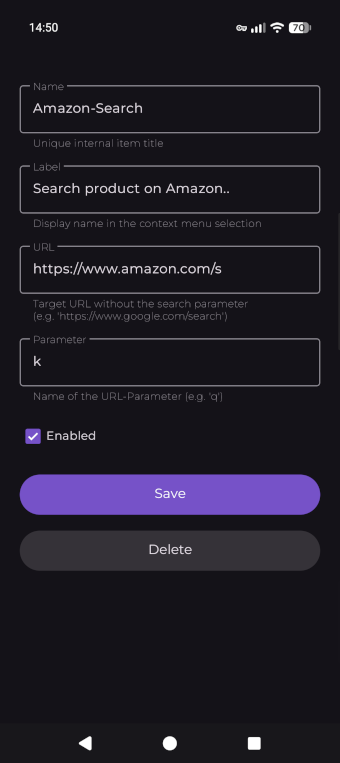
| 1. Add menu entries | 2. Configure each entry (How?) |
|---|---|
 |
 |
3. Select text, then choose Contextium |
4. Choose an action to start the web search |
 |
 |
Requirements
The target website must support passing search terms via URL parameter.
I recommend importing the example backup for a quick start.
How to find out the required URL for the entry?
-
Go to the website you want to link in Contextium
-
Execute the search with any search term and potential filters
-
View the full URL after submitting the search
-
Check if your search term appears in the URL: If it does, great! If not, this search might not work with Contextium.
- For example, if you searched for
Computer Mouse, the URL might look like this:
https://www.example.com/page/?search=Computer%20Mouse
- For example, if you searched for
-
Now, replace your search term with
%s:
https://www.example.com/page/?search=%s -
Then remove any unnecessary parameters and their values (such as hashes, etc.)
-
-
Enter the modified URL in a Contextium item and give it a try by selecting text in your browser and choose 'Contextium' from the context menu.
Examples
3 different URL cases
# Example 1: URL without existing parameters
URL: https://www.google.com/search
PARAM: q

# Selected text: "foobar"
# Item URL: https://www.google.com/search?q=%s
# Result: https://www.google.com/search?q=foobar
# Example 2: URL with additional parameters
URL: https://www.tradingview.com/chart/?x=y
PARAM: symbol

# Selected text: "FOO BAR"
# Item URL: https://www.tradingview.com/chart/?x=y&symbol=%s
# Result: https://www.tradingview.com/chart/?x=y&symbol=FOO%20BAR
# Example 3: URL without a named parameter
URL: https://www.example.com/%s
PARAM: (leave empty)

# Selected text: "FOO BAR"
# Item URL: https://www.example.com/%s
# Result: https://www.example.com/FOO%20BAR
Example file
You can download and import
the example.backup.json
file,
to get a glimpse of what's possible with Contextium.
Simply open the Menu in Contextium (swipe right), tap Import and select the json-file.
If you already have items, you might want to back up them first.
The Example file contains numerous working example entries:
- Ask AI (ChatGPT, Gemini, Claude, …)
- Search web (Wikipedia, Google, DuckDuckGo, Internet Archive, …)
- Search media (Google Images, OpenLibrary, iMDB, Audible, Goodreads, …)
- Search products (Amazon, eBay, …)
- Search forums (Reddit, StackOverflow, …)
- Developer tools (github, npm, packagist, urlscan.io, …)
- ...
This file is meant to help you understanding the different types of URLs, some are short, some are longer with additional parameter, and some without a named parameter. You can of course remove unwanted entries and customize it as you like.
Usage suggestions
Here you'll find some inspiration for how Contextium can be used. This is just a selection – you can add any website that supports URL-based searches.
Anything you regularly search for is perfectly suited for Contextium.
You could, for example, search for...
- AI (ChatGPT, Gemini, Claude, Grok, Perplexity, …)
- Search engines (Google, DuckDuckGo, Bing, Metacrawler, …)
- Books (Google Books, Goodreads, …)
- Audiobooks (Audible, BookBeat, …)
- Products (Amazon, eBay, Walmart, Alibaba, …)
- Stocks (Yahoo Finance, Google Finance, MarketWatch, …)
- Movies (Youtube, Rumble, IMDb, Letterboxd, Rotten Tomatoes, …)
- TV shows (TheTVDB, JustWatch, …)
- Music (Spotify, Apple Music, Discogs, …)
- Games (Steam, Metacritic, IGDB, …)
- Developer tools (Whois, encryption, scanner, …)
- Recipes, Translators, Academic topics, Patents, Jobs and more...
Tip: You can also add additional static text before/after the dynamic text selection value (in an items URL). This allows you to put the dynamics content in a fixed context, for example to ask an AI a specific question about what you selected.
You can find such examples in the example backup.
Let's say you regulary ASK an AI what Genres a book has - an item with an AI URL containing "What 15 Genres has this book: " before %s. This item can then serve as a 'Genre-Finder' for every book you search by selection.
Weblinks
- Repository on Github
- The privacy policy is available here and in the
PRIVACY.mdfile in this repository.
Privacy
Contextium performs simple URL‑based search requests through your default browser app and therefor does not collect or transmit personal data.
All configuration data is stored locally on your device.